
Automation Agents including Master Data
In intelligent document processing, automation agents with master data input matching allow you to enrich documents by pulling additional data from a master data table based. This functionality eliminates the need for manual data entry by automatically filling in fields based on predefined criteria.
Advantages of Using Master Data Input Matching
- Time Savings: automating the process of filling in document fields by matching values with master data saves significant time compared to manually entering data, especially when dealing with large volumes of documents.
- Increased Accuracy: the automated matching process ensures that the data entered into the document is accurate and consistent, reducing the risk of human error.
- Streamlined Workflow: the process of matching master data and filling in fields can also be performed within a DMS system. However, using this feature within the Parashift platform speeds up the workflow significantly, as it happens automatically upon document upload.
- Scalability: once the master data table is created, you can simply upload documents into the platform without needing additional manual interventions. The automation agent will handle the data matching, making the process scalable.
Overview of Master Data Matching
When documents are uploaded into the Parashift platform, the Automation Agent can compare extracted values against a uploaded master data table.
If a match is found, additional information from the master data table is automatically retrieved and used to populate fields within the document. This helps streamline document processing by reducing manual input and ensuring consistent data enrichment.
Master Data Matching can be configured in different ways:
- with specific conditions,
- in combination with other rules,
This allows flexible automation scenarios depending on the customer’s requirements and document structure.
Master Data Files
A Master Data file can be either an Excel file or a SQLite3 database file. It can contain multiple worksheets or tables, as well as columns with structured data. This allows different datasets to be stored and managed in a single file, depending on the automation requirements.
Master Data can be:
-
uploaded from your computer as an Excel file via the user interface or API,
-
uploaded as a SQLite3 file via API only,
-
created and managed directly from the user interface,
-
extended with new tables and columns directly in the user interface without needing to re-upload the file.
In most cases, updates to existing Master Data files are handled by uploading a new version of the file, which overrides the previous version.
This approach provides a flexible way to maintain and expand reference data used by Automation Agents for automated document enrichment and data extraction.
How It Works
- Matching
When a document is processed, the automation agent checks if the document’s value matches any entry in the master data. - Automation Agent Process
The automation agent is triggered whenever a document is uploaded. The following process occurs:- The defined value is extracted.
- The agent checks if this value exists in the master data table.
- Filling Document Fields Automatically
Once the matching value is found in the master data, the automation agent automatically fills in the corresponding fields in the document based on the master data columns. This eliminates the need for manual entry and ensures accuracy.
Steps to Set Up Automation Agent with Master Data Matching
- Create or Import Master Data Table:
Ensure that the master data table contains the relevant values and data columns that need to be matched with the documents.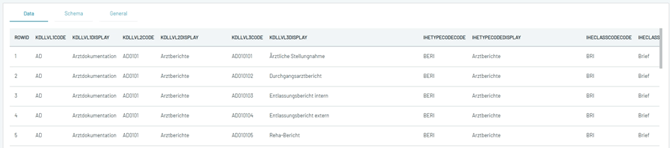
- Configure the Automation Agent:
We have to define the action, where we must select what table to use for the comparison, what information should be compared in the master data and what fields need to be filled.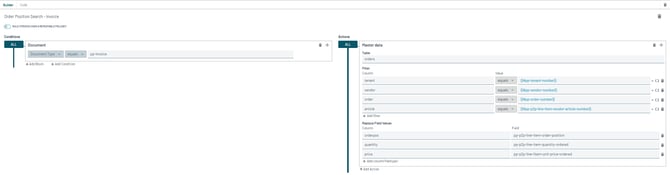
- Upload Documents:
Once the agent is configured, simply upload the documents. The automation agent will automatically match values with the master data and fill in the fields.
Master Data Matching Search
The Master Data Matching have two search configurations: Simple and Advanced.
-
Simple Search - ideal for larger databases.
-
Advanced Search - optimized for smaller databases where more precise matching is required.
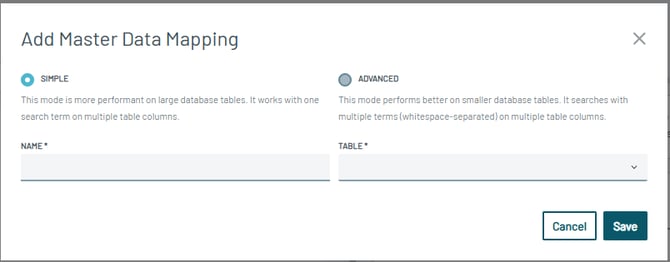
This gives you flexibility to tailor the matching strategy to your data size and use-case.
Expand Master Data Search
Comparison Options for Master Data Search
When using Master Data Search, different comparison methods can be selected depending on how the document value should be matched against the Master Data value.
Equals
Performs an exact comparison between the values.
Example:ABCD-EF = ABCD-EF → Match ✓Abcd-EF = ABCD-EF → No match ✕
Like
Performs a contains-based comparison. The document value can therefore match when it is contained within the Master Data value.
Example:ABcd-EF LIKE ABCD-EF → Match ✓ABcd-EF LIKE ABCD-EFG → No match ✕
Like Normalized
Performs the comparison using normalized values. This allows formatting differences that are handled during normalization to be ignored when matching the values.
Example:Abcd-EF normalized LIKE ÄBCDE → Match ✓AbcdEF normalized LIKE ABCD-EFG → No match ✕
The appropriate comparison option depends on how strictly the values should be matched.
Use Equals for exact matching and Like or Like Normalized when a more flexible comparison is required.