---
title: Benchmarking
description: Parashift provides benchmarks to get an accurate overview of the extraction quality.
---
[Skip to content](https://support.parashift.io/benchmark#main-content)
[Contact us](https://support.parashift.io/kb-tickets/new?hsLang=en) [Customer support portal](https://support.parashift.io/tickets-view?hsLang=en)
[](https://support.parashift.io/?hsLang=en)
Open main navigation
Close main navigation
- [Contact us](https://support.parashift.io/kb-tickets/new)
- [Customer support portal](https://support.parashift.io/tickets-view)
How can we help you?
- There are no suggestions because the search field is empty.
1. [Support Center](https://support.parashift.io/?hsLang=en)
2. [User Guides](https://support.parashift.io/user-guides?hsLang=en)
3. [General](https://support.parashift.io/user-guides?hsLang=en#general)
# Benchmarking
## Parashift provides benchmarks to get an accurate overview of the extraction quality.
### **How does it work?**
The benchmark compares the user manually validated values with the machine’s extracted values and shows the differences between the old and new training models after manual validation.
### How is the Benchmark setup?
Benchmark is provided in one Excel file named **Results** - which, containing few sheets inside.

### **Benchmark per field**
**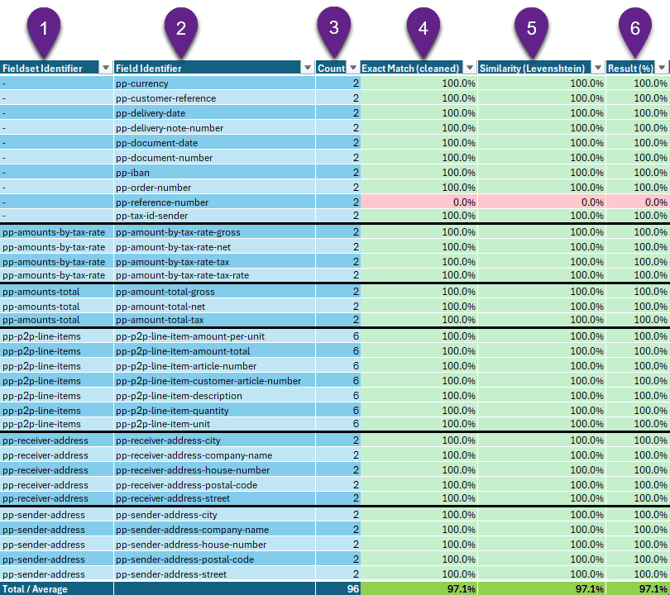**
1. **Fieldset identifier**
Identifier of the fieldsets.
2. **Field identifier**
Identifier of the field.
3. **Count**
Total count of fields.
4. **Exact Match**
The exact matches compare the user annotations with the machine predictions. The value displayed here is the number of annotations that have matched the predictions.
5. **Similarity (Levenshtein)**
The similarity score is similar to the exact matches, but predictions that almost match the annotations are considered here as correct.
6. **Result**
Result score in percentage.
### **Dark Processing**
In this sheet, you can review the percentage of dark processing.
Dark processing refers to fields that required no manual interaction; they were automatically extracted by the platform or accepted without validation.
### **Extraction Benchmark**
The Field sheets provide an in-depth view of each document and what has been extracted by the machine, and what has been extracted by the user.

1. **DocumentID**
Parashift ID of the document.
2. **Identifier**
Identifier of the field.
3. **FieldsetIdentifier**
Identifier of the fieldset the field belongs to.
4. **ItemIndex**
Index of the item (used for repeatable field sets, e.g., line items).
5. **PageNumber**
Page number where the value was extracted.
6. **Value**
Final validated value (ground truth).
7. **RecognitionValue**
Value extracted by OCR (raw recognition).
8. **RecognitionConfidence**
Confidence score of the OCR recognition.
9. **PredictionValue**
Value predicted by the machine learning model.
10. **PredictionConfidence**
Confidence score of the ML prediction.
11. **Confidence**
Final confidence score used by the system (can be a combination of OCR and ML).
12. **ValidationStatus**
Status of validation (skipped, done)
13. **CreatedAt**
Timestamp when the document was created.
14. **UpdatedAt**
Timestamp of the last update.
15. **TP (True Positive)**
Correctly predicted and validated value.
16. **FP (False Positive)**
Incorrect prediction where a value was predicted but should not have been.
17. **TN (True Negative)**
Correctly identified absence of a value.
18. **FN (False Negative)**
Missed prediction where a value should have been detected.
19. **LevenshteinSimilarity**
A measure of similarity between predicted and actual values.
### **How to analyze a benchmark**
The information in the benchmark can be used to analyze the quality of the machine's extractions. The first step of the analysis is reviewing the overview sheet. The value that determines the quality of a field the most is the exact match. Therefore, finding fields with a low exact match average is the first step. Afterwards a deeper analysis in the specific fields sheet is recommended.
### **Requesting a Benchmark**
The benchmark can be requested over the Parashift Support (support@parashift.io). The following information has to be provided:
- Tenant ID
- Document Type
- Time-line or Document IDs
- [Getting Started](https://support.parashift.io/getting-started?hsLang=en)
- [User Guides](https://support.parashift.io/user-guides?hsLang=en#main-content)
- [General](https://support.parashift.io/user-guides?hsLang=en#general)
- [Validation](https://support.parashift.io/user-guides?hsLang=en#validation)
- [Platform Workshops](https://support.parashift.io/user-guides?hsLang=en#platform-workshops)
- [Configuration Guides](https://support.parashift.io/configuration-guides?hsLang=en#main-content)
- [Document Type & Fields](https://support.parashift.io/configuration-guides?hsLang=en#document-type-fields)
- [Automation](https://support.parashift.io/configuration-guides?hsLang=en#automation)
- [Tenant (User management)](https://support.parashift.io/configuration-guides?hsLang=en#tenant-user-management)
- [Workflow (Upload Configuration, Separation, Classification)](https://support.parashift.io/configuration-guides?hsLang=en#workflow-upload-configuration-separation-classification)
- [Release Notes](https://support.parashift.io/release-notes?hsLang=en)
- [API Documentation](https://support.parashift.io/api-documentation?hsLang=en#main-content)
- [Platform API Configuration](https://support.parashift.io/api-documentation?hsLang=en#platform-api-configuration)
- [Technical API Documentation](https://support.parashift.io/api-documentation?hsLang=en#technical-api-documentation)
- [Professional Services](https://support.parashift.io/professional-services?hsLang=en#main-content)
- [Project-based Service Packages](https://support.parashift.io/professional-services?hsLang=en#project-based-service-packages)
- [Subscription-based Service Packages](https://support.parashift.io/professional-services?hsLang=en#subscription-based-service-packages)
[](https://support.parashift.io/?hsLang=en)
[Platform Live Status](https://status.parashift.io/) | [API Documentation](https://docs.parashift.io/)
[mailto:support@parashift.io](mailto:support@parashift.io)
Copyright © 2025, Parashift AG