
How to create Individual Field
To create a new individual field, follow these steps during the configuration of a new document type:
-
Create a new section in your document type.
- Select the option Add Field.
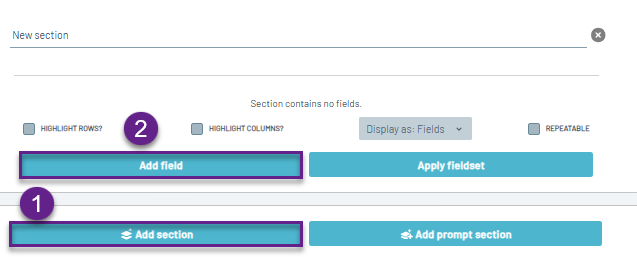
Then navigate to the Create New Field option in the bottom-right corner.
Configuration
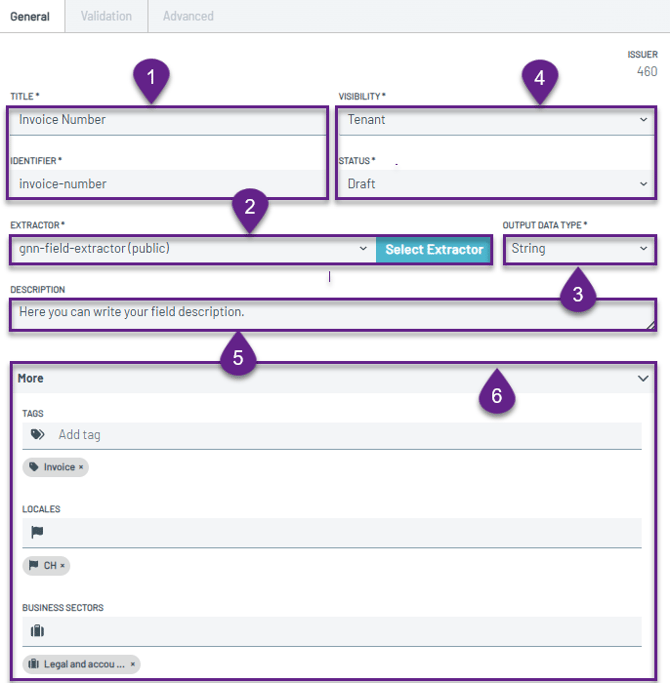
General Tab
-
Field Name and Identifier
The unique name and identifier. These values are used to reference and distinguish the field within the platform or in your integration. -
Extractor Type
Specifies the type of extractor. Remember to use only extractors designed for single field.
Learn more: Extractors - Data Output Type.
Specify the expected output format of the extracted data (e.g., string, float).
Learn more: Data Output Types -
Visibility and Status
Defines visibility and status of this field in your tenant hierarchy. - Description
Additional information that describes your field. - More drop-down menu with Tags
Tags can be used to categorize and improve the searchability of the field within the platform.
Validation Tab
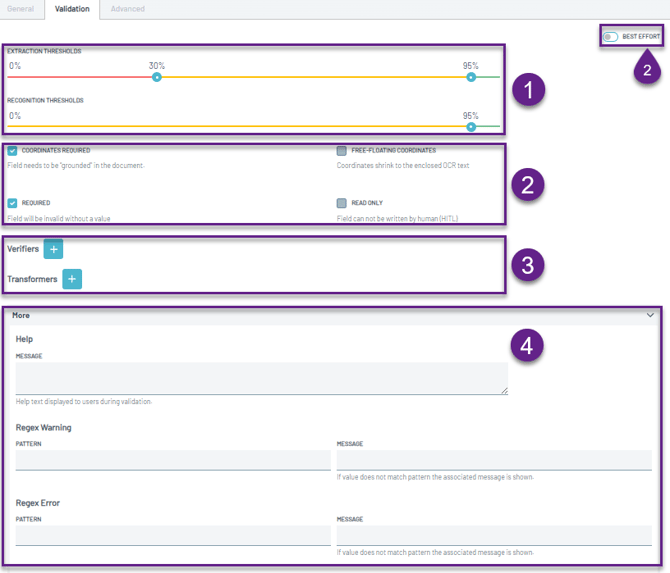
- Extraction and Recognition Thresholds
Set thresholds that determine the confidence level required for successful extraction and recognition.
Learn more: Confidence Thresholds - Validation Settings
Learn more: Validation Settings - Verifiers and Transformers
Learn more: Verifiers & Transformers - More drop-down menu with Help Messages and Regex Warning & Error
Provide guidance or validation feedback through help messages. Regex-based warnings and error messages can also be configured to notify users when input does not match the expected pattern.
Validation Rules
-
Every new individual fields does not contain any data and must be trained before it can produce reliable results.
-
A new individual field is trained exclusively on your documents and is not shared with other customers.
-
Keep in mind that proper validation is the key factor in achieving good results. Validation of all field present in the document is essential.