
Accessing the Home Page
After logging in, you’ll automatically land on the Home Page.
You can return to the Home Page at any time by selecting Home from the left-side navigation menu.
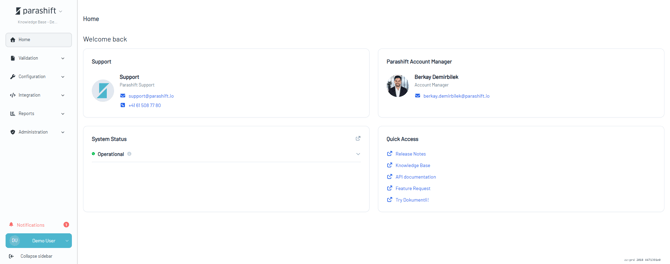
What’s Available on the Home Page?
The Home Page includes several widgets designed to help you stay informed and quickly access the information you need.
Platform Status
The Platform Status widget shows the current status of the platform, allowing you to quickly check whether all services are operating normally.
Contact Card
The Contact Card gives you quick access to important contact information, including:
- Support Team contact details
- Your Account Manager’s contact details
Quick Access
The Quick Access widget provides one-click access to important platform guides, documentation, and other helpful resources.
Volume Overview
Get a quick overview of your document volumes, with additional insights into volume and usage.
Notification Status
Stay informed about important notifications, platform updates, and other relevant information.
Coming Soon
We’re continuing to expand the Home Page. The following widgets and capabilities are planned for an upcoming release:
Tenant Quota
Keep track of your monthly page quota and usage directly from the Home Page.