
Overview
Tenant Security Management provides administrators with a clearer view of how users authenticate and access the platform.
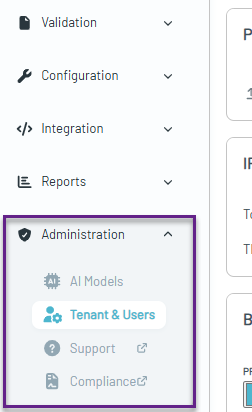
The Tenant & Users area is organized into four sections:
- General — Manage the tenant name and branding, including the logo and colors.
- Security — View authentication methods, IP whitelisting, and URL integration settings.
- Hierarchy — View the current tenant hierarchy.
- Users — Manage existing users, pending invitations, and user permissions.
Tenant Security
The Security section provides visibility into the security settings applied to a tenant, including authentication methods and other access controls.
The updated security model allows authentication requirements to be configured at the individual tenant level, providing greater flexibility for organizations that manage multiple customers, business units, or environments.
Supported authentication methods
A tenant can be configured to support one or more of the following authentication methods:
- Password
- Password + Two-Factor Authentication (2FA)
- Single Sign-On (SSO)
Authentication methods can be enabled individually or in combination, depending on the tenant's security requirements.
For example, a tenant might support both SSO and password + 2FA, letting users authenticate with whichever method is available to them.
Tenant-Level SSO Configuration
One of the key changes to Tenant Security Management is how Single Sign-On (SSO) is configured.
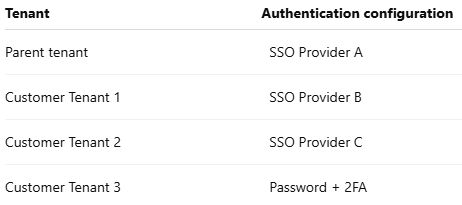
Previously, an SSO configuration was applied across the entire tenant hierarchy. SSO can now be configured separately for each individual tenant.
This means tenants within the same hierarchy can use different SSO providers and authentication methods.
For example:
Requesting Security Changes
If you need to change an authentication method, configure or update SSO, modify IP whitelisting, or change another tenant security setting, submit a request to Support.
Note: SSO is only available for customers with a Parashift Endclient Subscription.
When submitting your request, provide:
- The tenant name that requires the change.
- The security setting you want to add, remove, or update.
- For SSO changes, details of the required SSO provider/configuration.
Learn more: Single sign-on (SSO) - Any additional requirements that may help Support understand the requested configuration.