---
title: Learn how to use Verifiers
description: How to use verifiers to filter out false positive results
---
[Skip to content](https://support.parashift.io/verifiers#main-content)
[Contact us](https://support.parashift.io/kb-tickets/new?hsLang=en) [Customer support portal](https://support.parashift.io/tickets-view?hsLang=en)
[](https://support.parashift.io/?hsLang=en)
Open main navigation
Close main navigation
- [Contact us](https://support.parashift.io/kb-tickets/new)
- [Customer support portal](https://support.parashift.io/tickets-view)
How can we help you?
- There are no suggestions because the search field is empty.
1. [Support Center](https://support.parashift.io/?hsLang=en)
2. [Configuration Guides](https://support.parashift.io/configuration-guides?hsLang=en)
3. [Document Type & Fields](https://support.parashift.io/configuration-guides?hsLang=en#document-type-fields)
# Learn how to use Verifiers
## How to use verifiers to filter out false positive results.
Verifiers are one of the rule-based validation approaches, which filter out the false-positives. These let the user narrow down extraction results by applying some additional logic and checks to the extraction results.The verifiers will be processed after the transformers.
| **Verifier** | **Description** |
| --- | --- |
| coords: Position Range | Rejects candidates which are not with the rectangle made of \`left\`, \`right\`, \`top\`, \`bottom\` coordinates, e.g. at the top half page. |
| coords: Position Range Center | Rejects candidates whose centers are not with the rectangle made of \`left\`, \`right\`, \`top\`, \`bottom\` coordinates, e.g. at the top half page. |
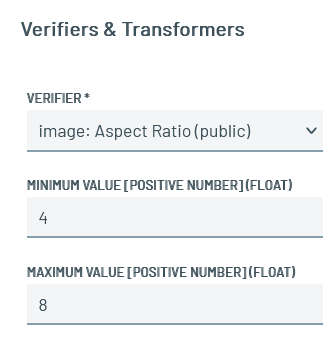
| image: aspect ratio | Restricts the results to a range of aspect ratio. |
| key-value: Pair Orientation | Defintion of keywords, which should be found in the near (horizontaly or verticaly) of the candidate. |
| number: Page Number | Checks whether a candidate is on the specified page. Candidates found on other pages are ignored. |
| number: Value Range | Can only be used if the \`output\_data\_type\` is numeric (integer or float). Candidates with a value that is smaller than \`minimum value\` or larger than \`maximum\_value\` are rejected. |
| page: Has Not Pattern | Page containing the specified \`pattern\` are rejected. |
| page: Has Pattern | Pages containing the specified 'pattern' are allowed. |
| page: Range | Checks whether a candidate is located within the specified page range. Candidates found outside the configured page range are ignored. |
| pick\_nth | This verifier picks the n-th element of the sorted candidate list. |
| string: Ends With | Candidates that do not end with the specific string are rejected. |
| string: Has Not Pattern | Candidates containing the specified \`pattern\` are rejected. |
| string: Has Pattern | Candidates that do not contain the specified \`pattern\` are rejected. |
| string: Starts Not With | Skips candidates whose prediction value start with a specific string. |
| string: Starts With | Candidates that do not start with the specific string are rejected. |
| string: String Length | Rejects candidates that do not have the right number of "characters". |
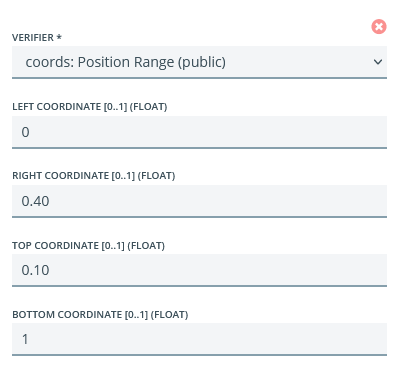
### Verifier "coords: Position Range"
Definition of coordinates, where the candidate have to be found. The verifier can restrict the result horizontally (left coordinate \[0..1\] (float) - right coordinate \[0..1\] (float)) and vertically (top coordinate \[0..1\] (float) - bottom coordinate \[0..1\] (float)). All values are defined in percent between 0 and 1, using a point as decimal.
| **Parameter** | **Description** |
| --- | --- |
| Left coordinate | Left coordinate of the rectangle (related to page width) 0 \<= value \<= 1 |
| Right coordinate | Right coordinate of the rectangle (related to page width) 0 \<= value \<= 1 |
| Top coordinate | Top coordinate of the rectangle (related to page height) 0 \<= value \<= 1 |
| Bottom coordinate | Bottom coordinate of the rectangle (related to page height) 0 \<= value \<= 1 |
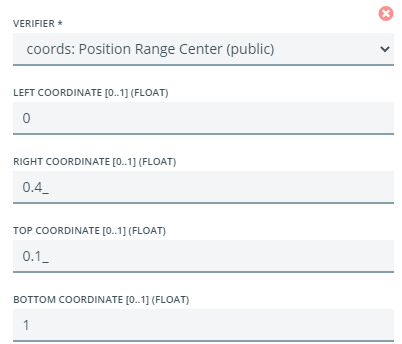
### Verifier "coords: Position Range Center"
Definition of coordinates, where the center of the candidate have to be found. The verifier can restrict the result horizontally (left coordinate \[0..1\] (float) - right coordinate \[0..1\] (float)) and vertically (top coordinate \[0..1\] (float) - bottom coordinate \[0..1\] (float)). All values are defined in percent between 0 and 1, using a point as decimal.
| **Parameter** | **Description** |
| --- | --- |
| Left coordinate | Left coordinate of the rectangle (related to page width) 0 \<= value \<= 1 |
| Right coordinate | Right coordinate of the rectangle (related to page width) 0 \<= value \<= 1 |
| Top coordinate | Top coordinate of the rectangle (related to page height) 0 \<= value \<= 1 |
| Bottom coordinate | Bottom coordinate of the rectangle (related to page height) 0 \<= value \<= 1 |
### Verifier "key-value: Pair Orientation"
Definition of keywords, which should be found in the near (horizontaly or verticaly) of the candidate.
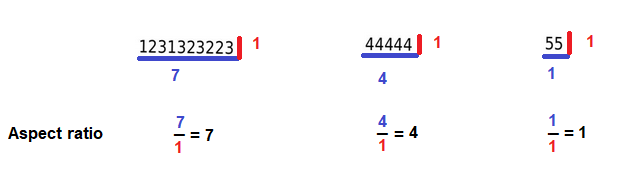
### Verifier "image: Aspect ratio"
Check the aspect ratio of the result tokens (length / height).
- [Getting Started](https://support.parashift.io/getting-started?hsLang=en)
- [User Guides](https://support.parashift.io/user-guides?hsLang=en#main-content)
- [General](https://support.parashift.io/user-guides?hsLang=en#general)
- [Validation](https://support.parashift.io/user-guides?hsLang=en#validation)
- [Platform Workshops](https://support.parashift.io/user-guides?hsLang=en#platform-workshops)
- [Configuration Guides](https://support.parashift.io/configuration-guides?hsLang=en#main-content)
- [Document Type & Fields](https://support.parashift.io/configuration-guides?hsLang=en#document-type-fields)
- [Automation](https://support.parashift.io/configuration-guides?hsLang=en#automation)
- [Tenant (User management)](https://support.parashift.io/configuration-guides?hsLang=en#tenant-user-management)
- [Workflow (Upload Configuration, Separation, Classification)](https://support.parashift.io/configuration-guides?hsLang=en#workflow-upload-configuration-separation-classification)
- [Release Notes](https://support.parashift.io/release-notes?hsLang=en)
- [API Documentation](https://support.parashift.io/api-documentation?hsLang=en#main-content)
- [Platform API Configuration](https://support.parashift.io/api-documentation?hsLang=en#platform-api-configuration)
- [Technical API Documentation](https://support.parashift.io/api-documentation?hsLang=en#technical-api-documentation)
- [Professional Services](https://support.parashift.io/professional-services?hsLang=en#main-content)
- [Project-based Service Packages](https://support.parashift.io/professional-services?hsLang=en#project-based-service-packages)
- [Subscription-based Service Packages](https://support.parashift.io/professional-services?hsLang=en#subscription-based-service-packages)
[](https://support.parashift.io/?hsLang=en)
[Platform Live Status](https://status.parashift.io/) | [API Documentation](https://docs.parashift.io/)
[mailto:support@parashift.io](mailto:support@parashift.io)
Copyright © 2025, Parashift AG