
Countdown — 3 months remaining for API Change!
We would like to remind all users about upcoming API changes related to the ongoing infrastructure migration. These changes will be rolled out gradually until October 2026.
Please review the updated API documentation and ensure your integrations remain compatible throughout the transition period.
Knowledge Base Article: Update to Parashift API & Domains.
Tenant Search box is now available in a new location
The Tenant Search box was moved to improve accessibility and make tenant switching faster and more intuitive.
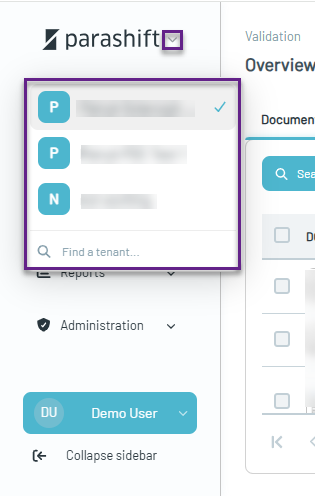
What's Changed?
-
The Search Tenant box has been moved to the top of the page and is now integrated into the tenant logo area.
-
Searching for tenants works the same way as before — simply enter keywords and select the tenant from the list of results.
-
The Collapse icon has been moved to the bottom of the left navigation menu.
-
The menu can now also be collapsed by clicking anywhere within the left menu area or via collapse sidebar icon.
Bring Your Own OpenAI API Models
The Parashift Platform now supports Bring Your Own OpenAI API models, allowing organizations to integrate their preferred AI technologies alongside Parashift's intelligent document processing capabilities.
Documents can be processed using Parashift models, customer-provided models, or a combination of both, enabling organizations to choose the approach that best fits their requirements.
Knowledge Base Article: Bring Your Own Model to the Parashift Platform
Updated URLs
Platform now uses a standardized URL structure across all validation workflows, including Overview, Separation, Classification, Extraction, Matching, and Quality Control (QC).
While direct access via URLs and hard-coded links is not officially supported (the embedded viewer remains the recommended approach), we recognize that many customers use bookmarks and integrations based on direct links.
To support these scenarios, legacy URLs remain backward for some time compatible and automatically redirect to the new standardized URL structure. When accessing the platform through a legacy URL, a notification will be displayed to help identify and update outdated links over time.
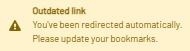
New URLs List
Overview
|
View |
URL |
|
Overview List |
validation/overview |
|
Overview Detail |
validation/overview/:id/detail |
|
Overview Batch |
validation/overview/:id/batch |
Separation
|
View |
URL |
|
Separation List |
validation/separation |
|
Separation Edit |
validation/separation/:id/edit |
|
Separation Batch |
validation/separation/:id/batch |
Classification
|
View |
URL |
|
Classification List |
validation/classification |
|
Classification Edit |
validation/classification/:id/edit |
|
Classification Detail |
validation/classification/:id/detail |
Extraction
|
View |
URL |
|
Extraction List |
validation/extraction |
|
Extraction Edit |
validation/extraction/:id/edit |
|
Extraction Detail |
validation/extraction/:id/detail |
Quality Control (QC)
|
View |
URL |
|
QC List |
validation/qc |
|
QC Edit |
validation/qc/:id/edit |
|
QC Detail |
validation/qc/:id/detail |
New Flow Connectors
This release adds comprehensive Microsoft Mail support with triggers for new, updated, and deleted emails, plus a full suite of actions covering drafts, attachments, folders, categories, and sending. Also new are PDF Converter components for converting text to PDF and merging PDFs, and an IMAP-based email receiver with optional PDF conversion of the email body.
Note: Utilities.Email.SendEmail has been deprecated — please migrate to MicrosoftMail.SendEmail or DocumentProcessing.Email.SendEmail.
Knowledge-base Article: Parashift Flows